發表文章

第13週WORD巨集+表單+TypeText+TypeParagraph+字串
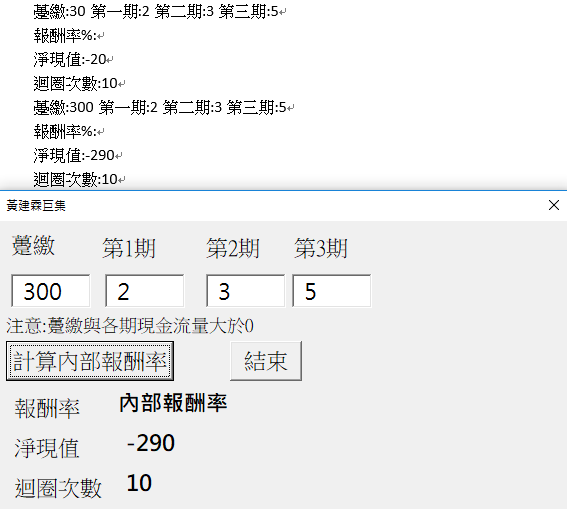
圖片
程式碼: Const period As Integer = 4 Const maxerror As Double = 0.0000001 Dim payment(period) As Double '廣域變數 4 維度的陣列 Private Sub CommandButton1_Click() Dim a, b, c, f, gap As Double Dim loopNumber As Integer a = 0 b = 1 gap = 10 loopNumber = 10 payment(0) = TextBox1.Value payment(1) = TextBox2.Value payment(2) = TextBox3.Value payment(3) = TextBox4.Value f = npv(a) If f = 0 Then Label9.Caption = 0 ElseIf f < 0 Then Label9.Caption = "內部報酬率小於 0." Else Do While gap > mexerror And Abs(f) > maxerror And loopNumber < 100 loopNumber = loopNumber + 1 c = (a + b) / 2 f = npv(c) If Abs(f) > maxerror And gap > maxerror Then If f > 0 Then a = c Else b = c gap = b - a End If Else Label9.Caption = c End If Loop End If Label10.Caption = f Label11.Caption = loopNumber Selection.TypeText ("躉...

第十二周 黃建霖 教你金融計算

躉繳 第1期 第2期 第3期 注意,包含首期躉繳的現金流量都大於0。 輸出: 報酬率: 淨現值: 迴圈次數: 黃建霖向劉任昌學習程式設計 <head> <style>  .h2{   font-size: 30px;   background-color:#eee;   padding: 20px;   box-shadow: 9px 9px pink; /* 陰影:x軸大小 y軸大小 顏色 */ }   .Takming {   border: 20px outset red;   background-color: green;   color: white;   text-align: center; } .pmt {   width: 60pt;   height: 20pt;   background-color: coral;   color: white;   text-align: right;} </style> </head> <body> <table border="1"> <tr align="center"><td>躉繳</td><td>第1期</td><td>第2期</td><td>第3期</td></tr> <tr><td><input class="pmt" type="number" /></td>    <td><input class="pmt" type="number" /></td>    <td><input class="pmt" type="number" /></td>    <td><input class="pmt" ...

第十一周進度

躉繳 第1期 第2期 第3期 第4期 注意,包含首期躉繳的現金流量都大於0。 報酬率: 淨現值: 迴圈次數:

黃建霖第十週陣列

1 最大 2 次大 3 大三 4 第四 5 第五 6 第六 呈現 呈現

第九周期中考

圖片
中央銀行受財政部委託,發行 91 182 273 364 天期國庫券, 決標貼現率:年息 %。 則每萬元($10,000)新臺幣的發行價格是$ (價格)

第九周

第七週2020/10/19 html vba 輸入國庫券面額: vba 輸入國庫券面額: <input type="text" id="a"> textbox commandbutton <input onclick="alert('你是大帥哥!')" type="button" value="按下我" /> vba 豬 狗 貓 鼠 vba 豬<input type="radio" />狗<input type="radio" />貓<input type="radio" />鼠<input type="radio" /> vba 豬 狗 貓 鼠 vba 豬<input type="radio" name="pet"/>狗<input type="radio" name="pet"/>貓<input type="radio" name="pet"/>鼠<input type="radio" name="pet"/> vba 董事長 總經理 財務長 vba <select><option>董事長</option><option>總經理</option><option>財務長</option></select> vba EXCEL VBA Private Sub CommandButton1_Click() Dim addnew As Range '定義 變數 addnew 是工作表的一個範圍 If Range("A1").CurrentRegion.Rows.Count = 1 Then Set ad...

第七周

網頁 VBA 輸入金額: VBA 輸入金額:<input id="a" type="text" /> VBA 網頁 VBA VBA <input type="button" value="單身狗狗" onclick="alert('一輩子!')">  VBA 豬 狗 貓 VBA 豬 狗 貓 VBA VBA Private Sub CommandButton1_Click() Dim addnew As Range '定義 變數 addnew 是工作表的一個範圍 If Range("A1").CurrentRegion.Rows.Count = 1 Then Set addnew = Sheets("DataTable").Range("A1").Offset(1, 0) Else Set addnew = Sheets("DataTable").Range("A1").End(xlDown).Offset(1, 0) End If addnew.Offset(0, 0).Value = TextBox1.Text '統一編號 addnew.Offset(0, 1).Value = TextBox2.Text '公司 addnew.Offset(0, 2).Value = TextBox3.Text '聯絡人 addnew.Offset(0, 4).Value = TextBox4.Text '地址 addnew.Offset(0, 3).Value = ComboBox1.Value '聯絡人職位 使用下拉式選單 ListBox1.ColumnCount = 5 '在清單方塊 ListBox1 顯示輸入的資料,5 columns ListBox1.RowSource = "A1:E65536" End Sub ...